Posts

Showing posts with the label games

DumbFire, a simple shooting game

Image
Pt En DumbFire is a very simple shooting game that I created with Python and pygame and you can find the code here . As of now, the game does not have a menu whatsoever nor it has any kind of instructions... (btw, to play it use the WASD keys to move and the space bar to shoot; if the coloured balls hit you, you lose health; if you shoot them, you get health back) I have been incredibly busy so I am not sure I will tidy this up any time soon but feel free to fork the repo in GitHub and to add different types of enemies and maybe some kind of power-up or whatnot. Actually, I would be very interested in hearing from you the answer to: if I could only add one single extra functionality to the game, what would that be? O jogo DumbFire é um jogo simplecíssimo de tiros que eu fiz com Python e com pygame. O código está no repo usual e convido-vos a fazerem uma cópia do mesmo para experimentarem alterar os tipos de inimigos, talvez juntar um ou outro power-up, etc. De mome...
MatchWalker, a puzzle game of shape and colour

Image
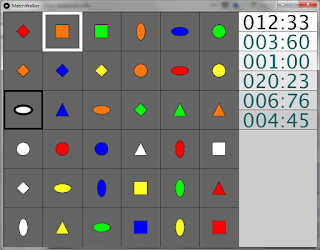
Pt En In today's post I will be sharing a game I made with just under $400$ lines in Processing, a wrapper for Java that makes drawing to the screen really easy. The goal of the game is really simple: go from the cell you are standing on (marked with the black outline of the ellipse, in the screenshot) to the cell that is framed in white. To do that, you can move a "cursor" (the black frame) with the $AWSD$ keys to choose the next cell you want to go to. To move, press the space bar. There are a couple of rules to moving, though: You can only move to the selected cell if it is in the same row or same column as the cell you are in; You can only move to the selected cell if it has the same colour or the same shape as the cell you are in. Rule number $1$ says you can only go in the directions these orange arrows cover: Rule number $2$ says that, from the cells specified by the above rule, you can only go to the white circle, diamond or vertical el...

Tutorial on programming a memory card game

Image
Pt En Este post vai ser um tutorial, não muito detalhado, sobre como fazer um jogo de memória com Python e pygame. O jogo que vamos implementar é um jogo comum: viramos uma série de cartas para baixo e temos que as virar duas a duas, tentando encontrar os pares. Claro que quando viramos duas cartas que não são um par, temos de as voltar de novo para baixo. Quando estou a criar um jogo, gosto de o ir desenvolvendo por etapas funcionais: partir o processo em várias fases que representem pontos nos quais eu tenho algo que posso testar. Deste modo, não só o processo se torna muito mais interessante, como posso ir controlando o aspeto do que estou a produzir. Deixo de seguida uma lista das etapas que eu pensei para este projeto; cada ponto da lista descreve a funcionalidade que o jogo já suporta: Criar um ecrã onde mostro todas as cartas dispostas, face para baixo; Clicar em cima de uma carta faz com que ela se vire para cima; Clicar na segunda carta verifica se encontrei...